Branching Model
Git Workflow
A short description of Gitflow branching model based on the following:
The Gitflow branching model generally involves five types of branches:
- master
- develop
- feature
- release
- hotfix

Master and Develop Branches
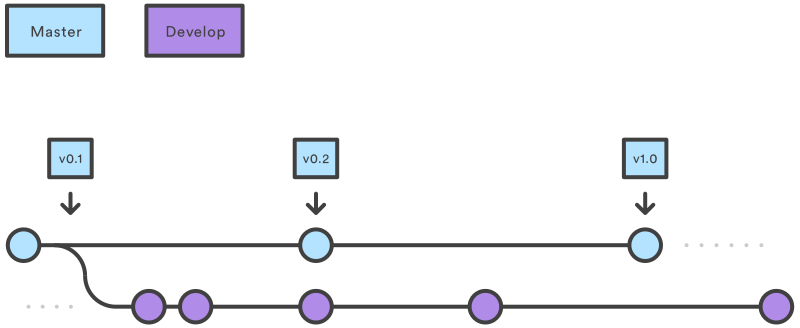
The two main branches in Gitflow branching model are master and develop.
.svg?cdnVersion=1491)
master branch
The master branch is the current release-ready branch. Nothing should be pushed to master branch directly without a pull request from a release branch or a hotfix branch. It is expected that every commit to master signifies a new major, minor or patch release. Commits to master branch, therefore, should be extremely infrequent compared to the develop branch as shown in the figure above.
develop branch
The develop branch is the current development branch. Similar to the master branch, nothing should be pushed to master branch directly without a pull request from a feature branch or if the changes are a bug fix to be incorporated in the next release. The idea is that multiple features can be integrated together in a single develop branch and tested on a regular basis. Once all features of a target release are complete, the develop branch can be merged to a release branch in preparation for the next release.
Feature branches
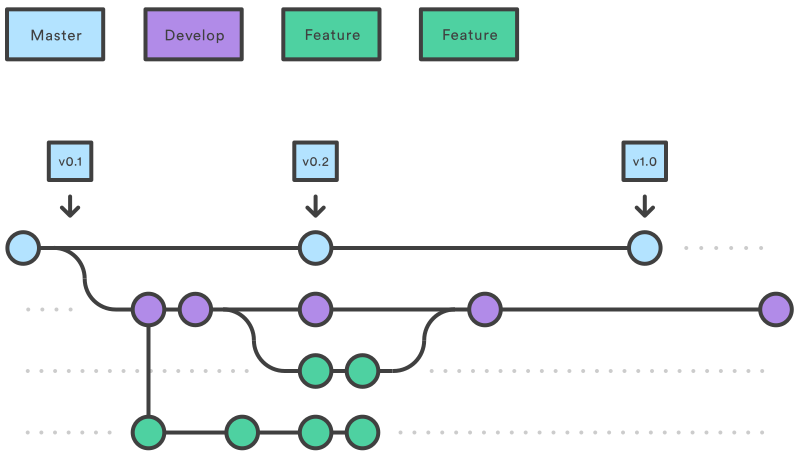
This is where development of any new feature is kept. Feature branches should be based on the develop branch as shown below:
All active development should be kept in a separate feature branch to avoid any conflicts with other features. One way to organize the feature branches is to keep them under a /feature hierarchy:
- feature/cool_feature
- feature/super_cool_feature
- feature/not_so_cool_feature
.svg?cdnVersion=1491)
Feature branches can be deleted once a feature is fully integrated into a release and merged to the master branch. However, it is expected that during development, a feature branch may require multiple pull requests to develop branch so it's reasonable to not delete the feature branch immediately after a merge.
Release branches
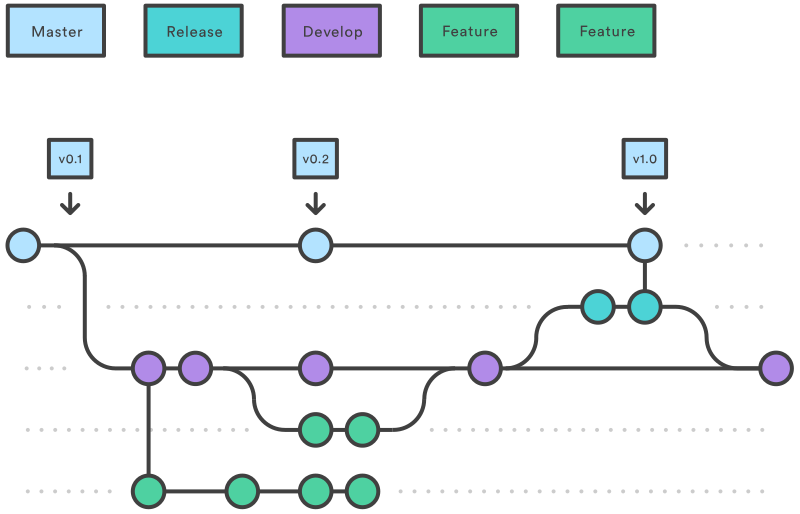
Release branches can follow a hierarchical scheme smilar to the feature branches:
- release/1.0.0
- release/1.0.1
- release/1.1.0
- release/2.0.0
.svg?cdnVersion=1491)
A release branch is forked from the develop branch when all features targeted for a release are fully integrated and tested in the develop branch.
Hotfix branches
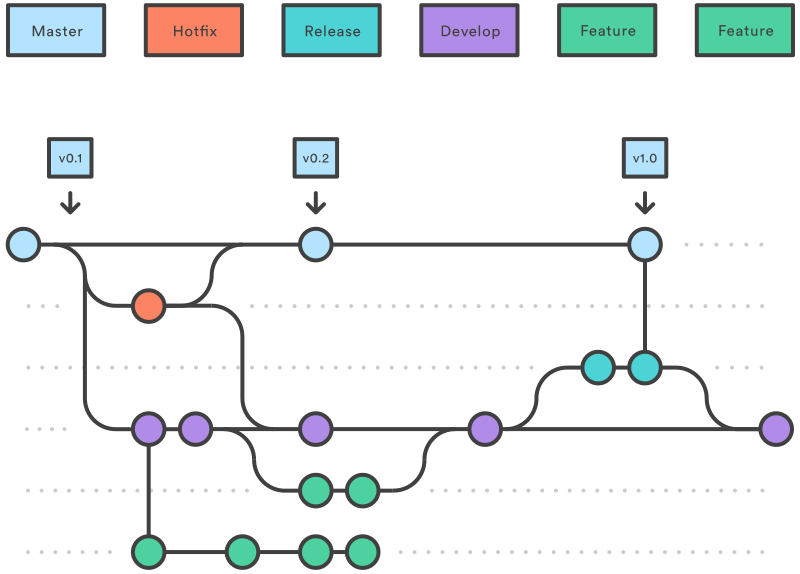
Hotfix branches are used for providing patches directly from the master branch. As the name suggests, a hotfix branch is generally used when an urgent patch needs to be released. Hotfixes can, however, increase the burden of merging the patch into develop so they should only be used in extremely rare circumstances.
.svg?cdnVersion=1491)
Bug Fixes
Where a bug fix is pushed depends on the development cycle. If a bug if discovered and fixed while a feature is in development, then it should be pushed to the appropriate feature branch first and then merged to develop. If, however, a bug is discovered after a feature is released then it can be pushed to the develop branch to be picked up for the next release. It is also reasonable to create a separate branch for a bug fix if the changes are not trivial or require collaboration between multiple contributors.